How to Run OSPREI
So you want to run OSPREI...

This guide should walk you through the process of downloading the OSPREI suite and running the initial test cases. The main focus is on how to make the code actually run. There is a bit of a learning curve to understand the different features, and that is the guide's focus, as opposed to immediately jumping into fine-tuning results. The guide runs through some of the available features and how to process the results into the standardized figures. If you have any questions or run into any errors please email ospreimodel [at] gmail.
OSPREI is a model for the Sun-to-Earth (or wherever) evolution of CMEs that combines three different CME models. ForeCAT simulates the coronal deflection and rotation of CMEs based on the magnetic forces from the solar background. ANTEATR simulates the interplanetary propagation of a CME and has quite a few different options that can be turned on and off. FIDO generates in situ profiles of the CME as it passes over a synthetic satellite. At this point, ANTEATR and FIDO run simultaneously so that the CME continues evolving as it passes over the satellite. The diagram below shows how the components of OSPREI interact. The gray boxes show the basic algorithm of each component and the arrows show the flow of information. The inputs have been organized into different thematic groups. The colored variable names indicate required inputs and the gray variables can be left at default values. The appendix has more details on the inputs and outputs.
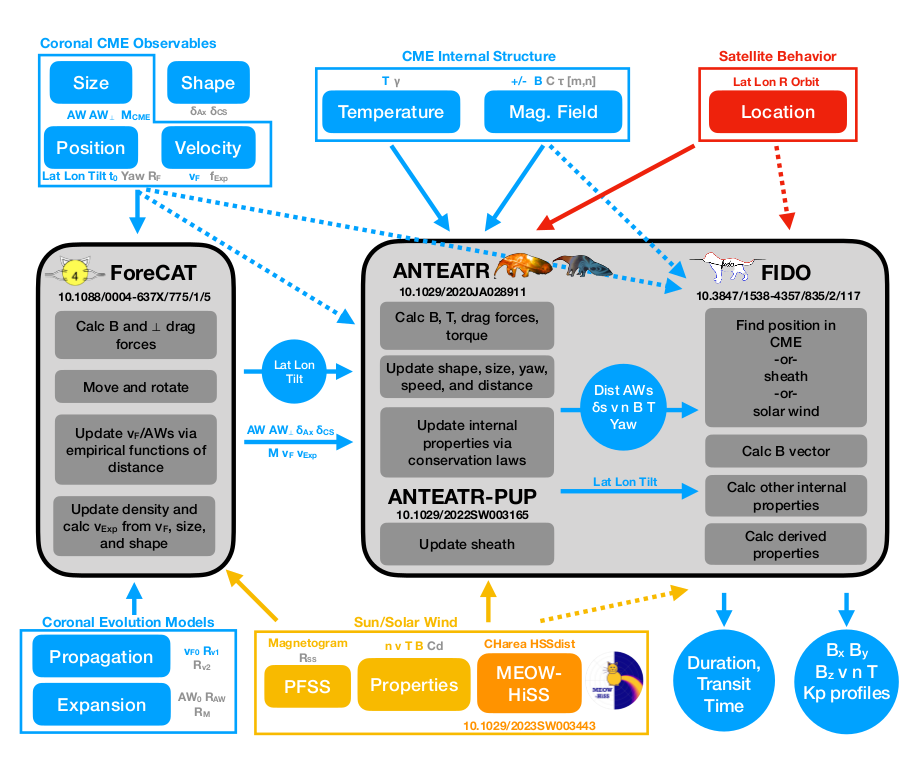
OSPREI includes the option to run all three components together, a single component, or ForeCAT-ANTEATR or ANTEATR-FIDO combinations. The most common use is probably either the full model or the ANTEATR-FIDO combo, which we will refer to as the interplanetary (IP) mode since it skips the coronal part.
The IP mode is important for several reasons. We have coronal observations of CMEs and routinely reconstruct their position in the outer corona. We can skip the coronal/ForeCAT portion of OSPREI and just run the IP portion using the reconstructed CME parameters, similar to what is done for most other CME arrival time models. ForeCAT is the most complex component, both in terms of computation time and in actually setting up a run. ForeCAT requires setting up the magnetic background before running OSPREI, so skipping it can save a lot of time if it is not needed. Coronal reconstructions, however, are notoriously inaccurate, or may not even be possible for some cases, so in other circumstances it is important to include the ForeCAT component. This demo will start with the IP mode, followed by the full version including ForeCAT. We attempt to keep this demo up to date but there may be minor differences as the repository tends to be updated more frequently than the guide.
For a more thorough overview on the individual components of OSPREI (ForeCAT, ANTEATR, and FIDO), how they connect together, how to determine the input parameters, and how to interpret the results, see the 2022 paper in Space Weather or on arXiv or the individual model papers linked to on the publications page.